How to Mount Television on the wall can dramatically change your living space. It saves floor space, creates a clean look, and can even improve your viewing experience. But to get that perfect result, you need to follow the right steps—from choosing the right mount to handling cables and ensuring safety.
Many people feel nervous about mounting a TV, but with clear guidance and the right tools, you can achieve a professional look at home.
This guide covers everything you need to know about how to mount a television, whether you’re putting up your first TV or looking to upgrade your setup. We’ll talk about the tools you need, how to find the right spot, the different types of wall mounts, and how to avoid common mistakes. You’ll also learn how to hide messy cables, check your work, and keep your setup safe. Even if you’ve never used a power drill before, this article will help you feel confident and ready.
Understanding TV Wall Mounts
Before you start, it’s important to know the main types of TV wall mounts. The right one depends on your room, TV size, and how you want to use your TV.
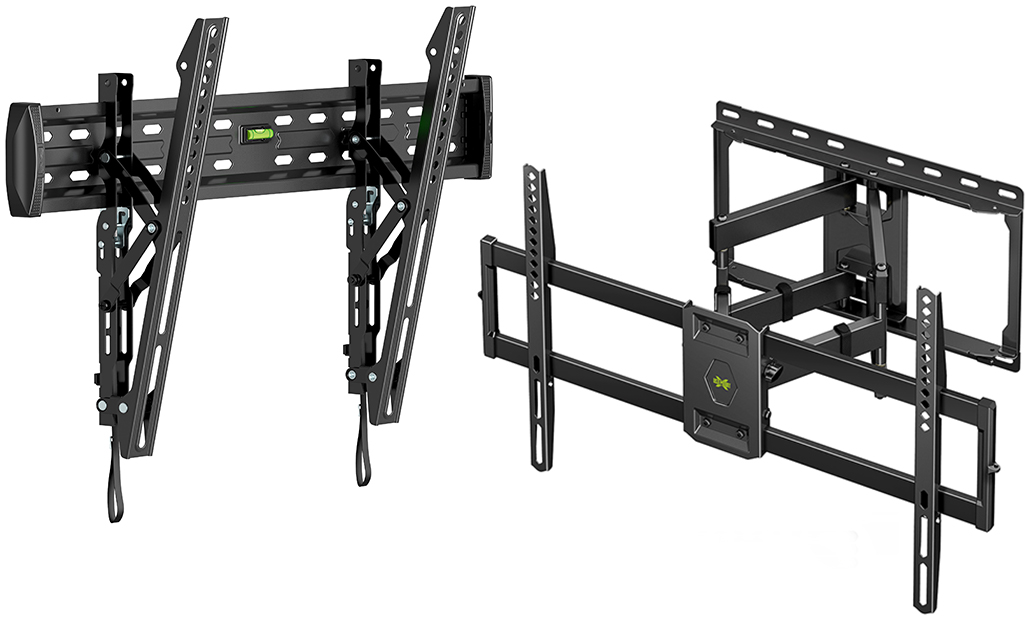
Fixed Wall Mounts
A fixed mount holds your TV flat against the wall. This is the simplest option and works well if you always watch TV from the same spot. Fixed mounts are often less expensive and easier to install, but you can’t adjust the angle.
Tilting Wall Mounts
A tilting mount lets you tilt the TV up or down. This helps reduce glare from lights or windows. It’s a good choice if you need to mount the TV a bit higher—like above a fireplace.
Full-motion (articulating) Wall Mounts
A full-motion mount lets you pull the TV away from the wall, turn it side to side, and tilt it. These mounts are best for rooms where you watch TV from different places or need to adjust the angle often.
Ceiling Mounts
Ceiling mounts are less common but useful in special cases. They’re used in rooms with limited wall space or in public areas where you want the TV to be visible from many angles.
Important Mount Features
When choosing a wall mount, look for:
- VESA compatibility: Most TVs use a standard called VESA for mounting holes. Check your TV’s manual or the back of the TV for the VESA pattern (e.g., 200×200 mm).
- Weight limit: Make sure the mount supports your TV’s weight.
- Wall type support: Not all mounts work with all wall types (e.g., drywall, brick, concrete).
Tools And Materials Needed
Having the right tools makes the job easier and safer. Here’s what you’ll need:
- TV wall mount kit (with screws, brackets, and instructions)
- Drill (with the right bits for your wall)
- Stud finder (for wood stud walls)
- Level
- Measuring tape
- Socket wrench or screwdriver
- Pencil
- Masking tape (optional, for marking)
- Cable management kit (optional, for hiding wires)
- Helper (mounting a TV is usually a two-person job)
Choosing The Right Wall Location
Finding the best spot for your TV is more important than you might think. The right spot improves comfort, viewing, and even safety.
Viewing Height
The ideal height puts the center of the TV at your eye level when sitting. For most people, this means the center of the TV is about 42 inches (106 cm) from the floor. If your room layout requires a higher mount, choose a tilting wall mount.
Sunlight And Glare
Avoid spots with direct sunlight or strong reflections. Windows behind or beside the TV can cause glare, making it hard to see the screen.
Wall Strength
Not all walls are strong enough for a heavy TV. Drywall alone won’t hold a big screen—always secure the mount to wall studs or solid masonry. For apartments, check with your landlord before drilling.
Outlets And Cables
Mount the TV near power outlets and cable connections. This reduces visible cords and makes installation easier.
Measuring And Marking
Taking time to measure and mark carefully helps you avoid mistakes.
- Measure the TV: Find the height and width, and the VESA hole pattern on the back.
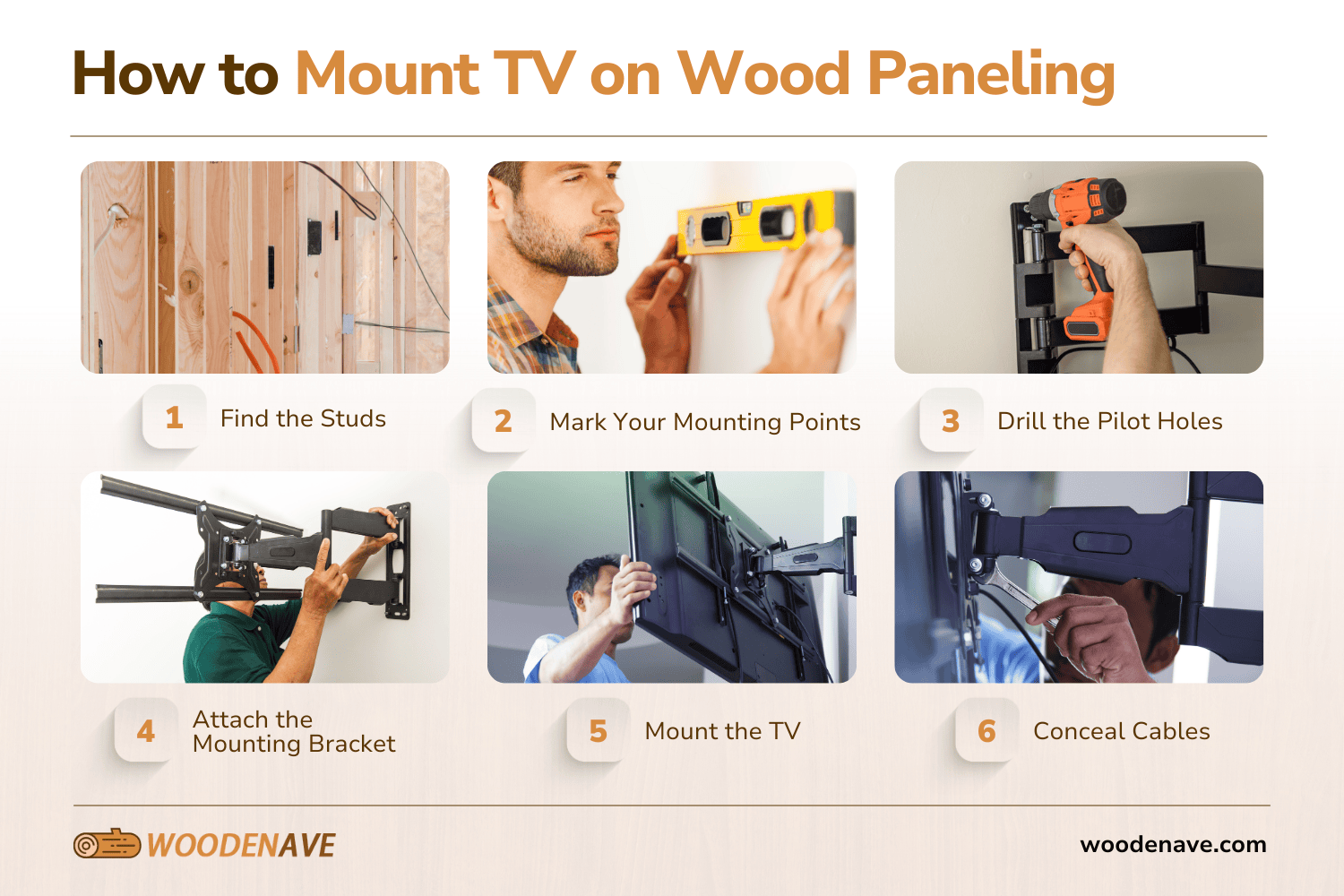
- Find the studs: Use a stud finder to locate at least two studs. Mark the centers with a pencil.
- Mark the mount height: Measure up from the floor to where the center of the TV will be. Mark this spot.
- Level the mount: Hold the wall plate against the wall and use a level to make sure it’s straight. Mark the screw holes.
A simple mistake here, like uneven marks, can lead to a crooked TV. Double-check all measurements before drilling.
Mounting On Different Wall Types
Not all walls are the same. Here’s how to handle the most common types.
Wood Stud Walls
Most homes have drywall over wood studs. Always attach the mount to the studs—not just the drywall.
- Use a stud finder to be sure of the stud location.
- Drill pilot holes for the lag bolts.
- If the studs are too far apart for your mount, use a mounting plate.
Concrete Or Brick Walls
Masonry walls are strong but need special tools.
- Use a masonry bit to drill holes.
- Insert anchors before adding lag bolts.
- Avoid using standard screws—they won’t hold.
Metal Stud Walls
Metal studs need extra care.
- Use special toggle bolts or anchors made for metal.
- Never mount directly into the metal—use the right hardware.
If you’re unsure about your wall, ask a professional or check your building plans.
Step-by-step Tv Mounting Process
Now, let’s walk through the actual mounting process. Each step matters, so don’t rush.
1. Attach The Mount To The Wall
- Position the wall plate: Hold it up to your marked spots.
- Drill pilot holes: Use the right-size bit for your bolts.
- Attach the plate: Use lag bolts (for wood) or anchors (for masonry). Tighten with a socket wrench.
- Check level: The plate must be straight. Adjust before fully tightening.
2. Attach Brackets to the TV
- Find the VESA holes on the back of your TV.
- Use the screws from your mount kit.
- Don’t overtighten—you could crack the TV’s housing.
- Some TVs need spacers for a snug fit.
3. Hang the TV on the wall plate
- With a helper, lift the TV and hook the brackets onto the wall plate.
- Secure any safety locks or screws.
- Double-check that the TV is firmly attached.
4. Adjust And Secure
- Use a level to check if the TV is straight.
- Adjust tilt or swivel, if your mount allows.
- Tighten all locking screws.
5. Connect Cables
- Plug in power, HDMI, and other cables.
- Make sure nothing pulls on the TV.
6. Hide And Organize Cables
Cables hanging down look messy. Here are ways to tidy them:
- Cable covers: Plastic channels that stick to the wall.
- In-wall kits: Let you run cables behind the drywall (check building codes).
- Cord sleeves: Simple fabric or plastic wraps.
Hiding cables isn’t just for looks—it reduces tripping hazards and protects connections.
Tv Size And Weight: Matching With Wall Mounts
Not every wall mount fits every TV. Here’s how to pick the right one.
Tv Size Compatibility
Mounts list a range of compatible screen sizes (e. g. , 32–70 inches). Using a mount outside this range may not be safe.
Weight Limits
Every mount has a maximum weight. Check your TV’s weight (with stand removed) in the manual or online. Never exceed the mount’s limit.
Vesa Patterns
This is the distance between the mounting holes on the back of the TV, measured in millimeters. Common patterns include 100×100, 200×200, 400×400, and so on. If the mount and your TV don’t match, you may need an adapter.
Here’s a quick comparison of common VESA patterns and compatible TV sizes:
| VESA Pattern (mm) | Typical TV Size Range | Example TV Weight |
|---|---|---|
| 100 x 100 | 19–32 inches | Up to 25 lbs (11 kg) |
| 200 x 200 | 32–43 inches | Up to 50 lbs (23 kg) |
| 400 x 400 | 43–55 inches | Up to 77 lbs (35 kg) |
| 600 x 400 | 55–75 inches | Up to 110 lbs (50 kg) |
Always check both the size and weight to be sure.
Common Mistakes And How To Avoid Them
Even handy people make mistakes when mounting a TV. Here are common errors and tips to avoid them.
Mounting To Drywall Only
Drywall can’t support a TV’s weight. Always use wall studs or masonry.
Ignoring Level
A crooked TV is distracting. Use a level at every stage.
Wrong Mount Size
Using a mount that’s too small or weak is dangerous. Check VESA and weight limits.
Over-tightening Screws
Tightening too much can strip threads or crack the TV. Firm, not forceful, is best.
Poor Cable Planning
Don’t forget about cables until the end—plan paths and lengths before mounting.
Not Checking For Obstructions
Before drilling, check for pipes, wires, or other obstacles in the wall. A simple stud finder with a live wire detector can help.
Skipping The Helper
Mounting a large TV alone risks dropping it or damaging the screen. Always get help for lifting and positioning.
Safety And Maintenance Tips
A mounted TV is safer than a TV on a stand, but only if done right.
- Double-check all bolts every few months for tightness.
- Childproof: Secure cables and make sure nothing can be pulled or climbed on.
- Avoid overloading: Don’t hang extra items from the mount.
- Clean gently: Dust with a soft cloth. Don’t spray cleaners directly on the TV.
Customizing Your Setup
You can make your TV area fit your style and needs.
Adding A Soundbar
Mount soundbars under the TV for better audio. Some mounts have special brackets for this.
Led Backlighting
Adding LED strips behind the TV creates an attractive glow and reduces eye strain in dark rooms.
Shelves And Cabinets
Floating shelves under the TV hold media players, game consoles, or decorations without cluttering the floor.
Smart Home Integration
Some wall mounts let you automate movement, adjusting the TV with a remote or app.
Example: Mounting A 55-inch TV on a drywall with wood studs
Let’s walk through a real-life scenario to make things clearer.
- Check your TV: 55 inches, VESA 400×400, 35 lbs.
- Buy a full-motion mount rated for 43–70 inches, 77 lbs max, VESA 400×400.
- Tools ready: Drill, level, stud finder, socket wrench.
- Find two wall studs, 16 inches apart.
- Mark the center at 42 inches above the floor.
- Hold up the wall plate, level it, and mark holes.
- Drill pilot holes into studs.
- Bolt the plate to the wall.
- Attach brackets to the TV.
- With a friend, lift and hang the TV.
- Tighten locking screws, plug in cables.
- Use a cable cover to hide wires.
Following these clear steps prevents mistakes and gives a safe, attractive result.
Advanced Tips For A Professional Look
Here are some extra touches to make your setup stand out:
- Template method: Use masking tape or a cardboard cutout to simulate the TV’s size on the wall before drilling.
- Paint cable covers: Match them to your wall color for a seamless look.
- Remote IR repeaters: If you hide your cable box in a cabinet, use an IR repeater to control it.
- Surge protection: Plug your TV into a surge protector to avoid damage from power surges.
Many professional installers use these tricks for clean, high-end results.
Comparing Wall Mount Types
Here’s a comparison of the three main wall mount types to help you decide:
| Mount Type | Adjustability | Best For | Price Range |
|---|---|---|---|
| Fixed | None | Single seating position, low budgets | $15–$50 |
| Tilting | Vertical tilt only | Above the fireplace, glare reduction | $25–$70 |
| Full-Motion | Swivel, tilt, extend | Large rooms, flexible viewing | $40–$200+ |
Choose the type that fits your room and viewing habits.
When To Call A Professional
Mounting a TV isn’t always a DIY job. Call an expert if:
- You have very large or expensive TVs (over 75 inches)
- Your walls are concrete, brick, or metal, and you lack the right tools
- You’re not comfortable with power tools or electrical wiring
- You need to run cables through walls (building codes apply)
- You want a guaranteed perfect finish
Many hardware stores and electronics retailers offer installation services. It can cost $100–$300 but saves time and stress.
Real-world Data: TV Mounting Trends
Mounting TVs is more popular than ever. In 2023, over 60% of US households had at least one wall-mounted television. The most popular screen sizes are 55 and 65 inches, and full-motion mounts are growing in demand, especially in open-plan homes. Modern mounts handle heavier TVs with thinner profiles—some models keep the TV less than one inch from the wall.
A 2022 survey found that 48% of DIY TV mounting projects failed on the first try—mainly due to missed wall studs or incorrect measurements. Taking time to plan and measure carefully makes success much more likely.
For more data on TV technology, see this Wikipedia overview.
Frequently Asked Questions
What Tools Do I Need To Mount A Television?
You’ll need a drill, stud finder, level, measuring tape, screwdriver, and the TV mount kit. For masonry walls, get a masonry drill bit and anchors. Having a helper is highly recommended.
Can I Mount a TV on Drywall Without Studs?
Mounting directly to drywall is not safe for most TVs. You need to anchor the mount into wall studs. For very small TVs (under 25 lbs), special drywall anchors might work, but it’s still risky.
How High Should I Mount My TV?
The center of the TV should be about 42 inches from the floor for most seated viewers. Adjust for your eye level and seating arrangement. If mounting higher, use a tilting mount to improve the angle.
How Do I Hide TV Cables After Mounting?
You can use cable covers, cord sleeves, or in-wall cable kits. In-wall kits look the cleanest but require more work and may need approval in rentals. Always use cables rated for in-wall use if you go that route.
Is It Safe To Mount A Large Tv By Myself?
It’s not safe to mount a large or heavy TV alone. TVs over 40 inches or 30 lbs should be lifted and positioned by two people to avoid injury and damage.
Mounting a television can be a rewarding DIY project that adds style and function to your home. With the right tools, careful planning, and attention to detail, you can enjoy a safe and attractive setup for years to come. Take your time, follow each step, and don’t hesitate to ask for help if you need it.
Your perfect TV wall is within reach.