
The Ultimate Guide to the Best Computer for Elderly in 2026: Easy, Reliable Tech That Keeps Seniors Connected and Independent
In 2026, technology isn’t just a luxury for older adults—it’s a lifeline. Whether it’s video-calling grandchildren across the globe, managing online banking without leaving home, reading the latest news in large, clear text, or enjoying family photos and streaming shows, the right computer can dramatically improve quality of life, reduce isolation, and support mental sharpness. But many seniors face real challenges: declining vision, reduced dexterity from arthritis, unfamiliarity with complex interfaces, or worries about viruses and technical glitches.

That’s why choosing the best computer for elderly users requires focusing on simplicity, large screens, built-in accessibility tools, reliable support, and minimal maintenance. This 3000-word guide (based on 2026 expert reviews from Wirecutter, PCMag, Consumer Reports, and senior-focused sites) breaks down everything you need to know. We’ll cover key features to prioritize, top product recommendations with real specs and pros/cons, setup tips, essential accessories, software recommendations, and a complete buying checklist. By the end, you’ll have a clear path to the perfect machine—whether for a parent, grandparent, or yourself.
Why Elderly Users Need Special Computers: Common Challenges and Benefits
Aging brings changes that generic laptops or desktops often ignore. According to aging-technology experts, over 60% of seniors report vision difficulties that make small text or glare-heavy screens frustrating. Arthritis or tremors make tiny trackpads and fiddly mice hard to use. Cognitive changes or tech anxiety can turn a simple email into a stressful ordeal. Many worry about scams, viruses, or “breaking” the device.
The right computer flips this script. Large, high-contrast displays reduce eye strain. Voice commands and screen readers allow hands-free use. Simplified operating systems (like ChromeOS or macOS) eliminate bloatware and auto-updates that confuse users. Built-in webcams and microphones make FaceTime or Zoom effortless for staying connected—proven to combat loneliness, which affects nearly 1 in 3 older adults.
Benefits go beyond basics: independence (online shopping, prescriptions, doctor portals), cognitive engagement (puzzles, learning apps), and safety (secure banking, emergency alerts). In 2026, models with AI assistants (like Apple Intelligence or Google Gemini) will even suggest reminders or simplify tasks automatically.
But not every computer works. High-end gaming rigs are overkill and intimidating. Tiny ultrabooks frustrate with small keys. Cheap no-name brands lack support. We’ll focus on proven 2026 options that balance ease, performance, and value (prices range $400–$1,800 depending on model).
Key Features to Look For in a Senior-Friendly Computer
Before diving into specific models, here’s what truly matters in 2026:
- Screen Size and Quality (15″+ or 24″+ Recommended): Bigger is better for reading without squinting. Look for Full HD (1920×1080) or higher resolution, anti-glare coatings, and high brightness (300+ nits). Retina or OLED displays offer crisp text and vibrant colors. Adjustable stands or tiltable screens help with posture and neck strain.
- Operating System Simplicity:
- ChromeOS (on Chromebooks): Simplest choice—browser-based, automatic updates, built-in virus protection, and minimal learning curve. Ideal for email, web, YouTube, and Google Meet.
- macOS: Intuitive, with excellent VoiceOver screen reader, Zoom magnification, and Siri voice control. Seamless if the user has an iPhone.
- Windows 11: Customizable with Magnifier, Narrator, high-contrast modes, and Cortana/ Copilot, but can feel cluttered unless simplified.
- Accessibility Tools: High-contrast themes, large font scaling, voice typing, dictation, on-screen keyboards, and touch support. 2026 models integrate AI for smarter assistance (e.g., describing images aloud).
- Ease of Use and Ergonomics: Backlit keyboards with large, spaced keys. Responsive trackpads or touchscreen options. Lightweight laptops (<4 lbs) for portability or stable all-in-one (AIO) desktops that eliminate cable clutter.
- Performance and Reliability: At least 8GB RAM and a solid-state drive (SSD) for smooth operation—no lag during video calls. Long battery life (8+ hours) for laptops. Quiet fans and solid build quality.
- Webcam, Audio, and Connectivity: 1080p+ webcam with auto-framing (Center Stage). Good speakers/microphones. Wi-Fi 6/7 for stable video. Bluetooth for wireless headphones or mice.
- Security and Support: Automatic updates, facial/fingerprint login, and easy remote help (Apple Genius Bar or Windows Remote Assistance). Extended warranties are worth it.
- Budget and Value: $500–$800 for solid basics; $1,000+ for premium longevity. Factor in accessories.
- Other Perks: Touchscreens for tablet-like use, voice assistants, and family-sharing features.
Prioritizing these ensures the computer feels like a helpful friend, not a frustrating puzzle.
Top 5 Best Computers for the Elderly in 2026: Detailed Reviews
Here are our hand-picked 2026 standouts, tested and recommended across sources for senior users. Each includes why it excels for elderly needs, specs, pros/cons, and approximate pricing (US market; check local retailers like Best Buy, Amazon, or Apple for BD availability via import or similar models).
1. Apple iMac 24-inch (M4 Chip) – Best All-in-One Desktop Overall

The Apple iMac 24-inch with M4 chip tops the list as the ultimate senior desktop in 2026. Its all-in-one design packs everything into a slim, colorful 24-inch 4.5K Retina display—no separate tower or messy cables. The massive, vibrant screen is a game-changer for aging eyes: text pops, photos look lifelike, and video calls feel immersive. macOS Ventura/Sequoia offers unmatched accessibility—VoiceOver reads everything aloud, Zoom magnifies with a simple gesture, and Apple Intelligence suggests simplifications like “remind me to call the kids.”
Key Specs: 24-inch 4.5K Retina display (218 ppi), M4 chip (10-core CPU/GPU), 16GB unified memory (upgradable), 256GB+ SSD, 12MP Center Stage webcam with auto-framing, excellent speakers, Wi-Fi 6E, Touch ID keyboard/mouse included. Weighs under 10 lbs on its stand.
Why Perfect for the elderly? One-plug setup takes minutes. The large display reduces strain; voice control handles most tasks. Apple’s legendary support means a trip to the store (or remote) fixes issues fast. Quiet operation and long-term software updates (5–7+ years) mean no obsolescence worries. Seniors with iPhones love Continuity features like texting from the iMac.
Pros: Stunning screen, effortless usability, powerful yet silent, family photo management via iCloud, secure Face ID-like login. Cons: Higher price; not portable; no touchscreen (though trackpad suffices). Price: Starting ~$1,299 (base model). Great value for 5–10 years of use.

Users rave about grandchildren video calls, feeling “like they’re in the room.” If your loved one stays mostly at a desk or kitchen table, this is unbeatable.
2. Apple MacBook Air 15-inch (M5 Chip) – Best Portable Laptop

For seniors who want mobility (bedroom to living room, or travel to family), the 15-inch MacBook Air M5 is Wirecutter’s top senior pick. Ultra-thin and light (just 3.3 lbs), it boasts a gorgeous 15.3-inch Liquid Retina display that’s bright, color-accurate, and easy on the eyes. Fanless M5 chip delivers snappy performance for browsing, email, and Zoom without noise or heat.
Key Specs: 15.3-inch Liquid Retina (2880×1864), M5 chip, 16–24GB memory, 256GB–1TB SSD, 12MP webcam, up to 18-hour battery, backlit keyboard, Force Touch trackpad, Wi-Fi 7, macOS with full accessibility suite.
Why Perfect for the Elderly: Large screen + lightweight = no strain carrying or viewing. Siri and dictation replace typing. Excellent build quality feels premium yet approachable. Apple’s ecosystem syncs seamlessly with iPhone contacts and photos. A long battery means less plugging in.
Pros: Portable yet spacious, best-in-class support and battery, customizable accessibility, and future-proof. Cons: Premium pricing; no touchscreen. Price: ~$1,249–$1,499.

Seniors love flipping it open and instantly connecting—no boot-up delays or updates interrupting.
3. Lenovo Yoga AIO 27-inch – Best Windows All-in-One Alternative
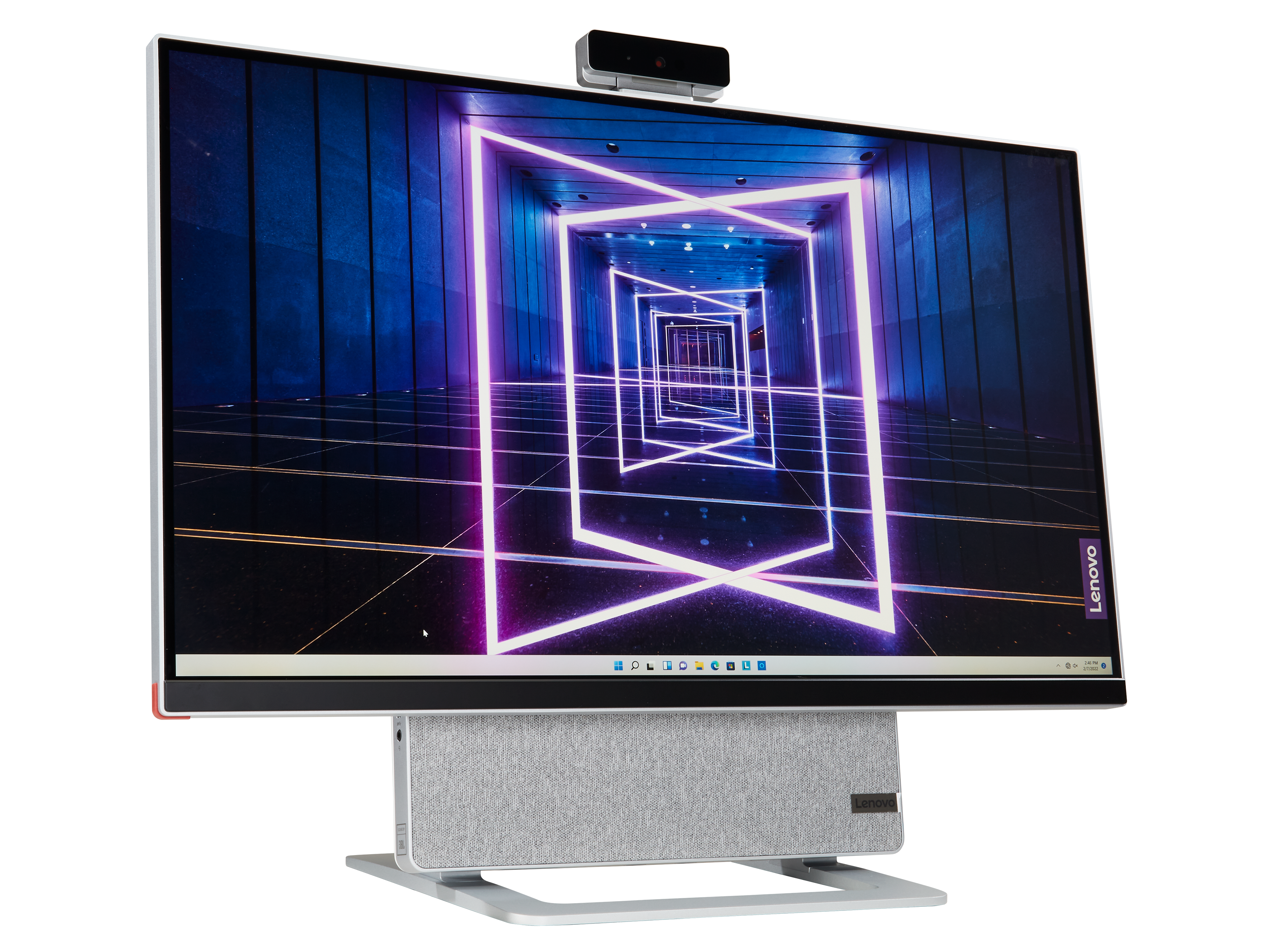
Windows fans or those wanting touchscreen versatility should consider the Lenovo Yoga AIO 27-inch. Its adjustable 27-inch QHD display tilts like a giant tablet, making it intuitive for finger navigation. Windows 11’s accessibility tools (Magnifier, Narrator, and high-contrast mode) shine here, and the built-in soundbar delivers clear audio for calls or music.
Key Specs: 27-inch QHD touchscreen, Intel Core Ultra or AMD Ryzen, 16GB+ RAM, 512GB+ SSD, 5MP webcam with privacy shutter, adjustable stand, Windows 11, Harman Kardon speakers.
Why Perfect for the Elderly: Huge touch screen feels natural (like a giant phone). Easy to adjust height/angle for comfort. Copilot AI helps with tasks like “write an email to my doctor.” Solid performance for everyday use without complexity.
Pros: Massive adjustable screen, touchscreen for easy tapping, good value, versatile (use as a monitor). Cons: Heavier than laptops; Windows can feel busier than macOS/ChromeOS. Price: ~$999–$1,299.

Perfect for kitchen counters or shared family spaces.
4. Samsung Galaxy Chromebook Plus 15.6-inch – Best for Simplicity and Security

If your senior just wants email, browsing, YouTube, and video calls without hassle, the Samsung Galaxy Chromebook Plus is ideal. ChromeOS is virtually virus-proof and updates itself. The bright 15.6-inch display and lightweight design (under 3.5 lbs) make it senior-friendly.
Key Specs: 15.6-inch FHD+ display, Intel Core Ultra, 8–16GB RAM, 256GB+ storage, 1080p webcam, long battery, touchscreen option available.
Why Perfect for the Elderly: Dead-simple interface—everything in the browser. Google Assistant handles voice commands. Automatic backups and security reduce anxiety.
Pros: Affordable, ultra-secure, fast for basics, lightweight. Cons: Less powerful for heavy software; relies on the internet. Price: ~$599–$799.
5. Dell Inspiron 15 3000 Series – Best Budget Windows Laptop

For value-conscious buyers, the Dell Inspiron 15 3000 (15.6-inch FHD) offers reliable basics at a low price. Large screen, decent webcam, and Windows accessibility features make it accessible.
Key Specs: 15.6-inch FHD, Intel Core i5 or equivalent, 8–16GB RAM, 256–512GB SSD, HD webcam, Windows 11.
Why Perfect for the elderly: Affordable entry point with familiar Windows. Touchscreen variants available. Dell support is widespread.
Pros: Budget-friendly, spacious keyboard, good for basics. Cons: Not as premium or long-lasting as Apple; can feel slower over time. Price: ~$449–$699.

(For larger budget options, consider ASUS Vivobook 17-inch models with even bigger screens—similar price range, great for reading.)
Comparison Table and Buying Guide
| Model | Screen Size | OS | Best For | Price Range | Key Senior Perk |
|---|---|---|---|---|---|
| Apple iMac 24″ M4 | 24″ | macOS | Stationary use | $1,299+ | Stunning clarity + support |
| MacBook Air 15″ M5 | 15.3″ | macOS | Portable | $1,249+ | Lightweight + battery |
| Lenovo Yoga AIO 27″ | 27″ | Windows | Touch/versatile | $999+ | Adjustable huge screen |
| Samsung Chromebook Plus | 15.6″ | ChromeOS | Basics/security | $599+ | Dead-simple, secure |
| Dell Inspiron 15 | 15.6″ | Windows | Budget | $449+ | Affordable reliability |
Buying Tips: Test in-store if possible. Prioritize models with 2+ year warranties. In Bangladesh, check local availability via Daraz, Ryans Computers, or Apple resellers. Consider import duties. Budget extra for accessories (below).
Setup Tips, Accessories, and Software Recommendations
Setup is crucial. For any device:
- Enlarge text/icons immediately (Settings > Display).
- Enable voice control and high-contrast mode on day one.
- Set up family sharing or remote access (e.g., TeamViewer for grandkids to help).
- Install only essentials: browser, email app, Zoom, WhatsApp, news apps.
Must-Have Accessories (~$50–150 total):
- Large-print wireless keyboard/mouse (e.g., Logitech large-key sets).
- External webcam if needed (1080p models).
- Screen protector or blue-light filter glasses.
- Headphones with volume control for clear calls.
- Laptop stand or riser for posture.
Software for Seniors:
- Browser extensions: Large Font or Read Aloud.
- Apps: Google Photos, Duolingo (brain training), Calm (relaxation).
- Security: Built-in tools + simple password manager like Apple Keychain.
Regular maintenance: Schedule weekly “tech tea” with family to check updates together.
Conclusion: Invest in Connection and Ease
The best computer for the elderly in 2026 isn’t the most powerful—it’s the one that disappears into the background, letting your loved one focus on joy, family, and independence. Whether you choose the elegant Apple iMac for its breathtaking screen and support, the portable MacBook Air for flexibility, or a budget-friendly Chromebook for pure simplicity, any of these picks will transform daily life.
Start with your seniors’ main needs (video calls? Browsing? Portability?). Visit a store, involve them in the decision, and celebrate the first successful video call. Technology bridges generations—choose wisely, and you’ll gift not just a device, but confidence, connection, and countless happy moments.