
The Best Desktop Computers for Business in 2026: Expert Picks for Productivity, Reliability, and Future-Proof Performance
In 2026, the modern business landscape demands more from computing hardware than ever before. Whether you’re running a small startup from a home office, managing a mid-sized enterprise with hybrid teams, or overseeing creative workflows in design agencies, a reliable desktop computer remains the backbone of productivity. Unlike laptops, desktops offer superior power, easier upgradability, better cooling for sustained performance, and often lower long-term costs—critical factors when AI-powered tools, multi-monitor setups, and data-intensive applications are the norm.

This comprehensive guide dives deep into the best desktop computers for business this year. We’ve analyzed expert reviews from PCMag, ZDNet, Forbes Vetted, Consumer Reports, and TechRadar, focusing on models that excel in enterprise-grade security, manageability, performance under load, and value. From compact mini PCs for space-constrained offices to powerful towers for workstations and sleek all-in-ones for collaborative environments, these picks balance raw specs with real-world business needs like remote management, data protection, and seamless integration with tools like Microsoft 365, Adobe Creative Cloud, or ERP systems.
We’ll cover why desktops outperform laptops for most business use cases, a detailed buying guide, our top recommendations with in-depth specs/pros/cons, a comparison table, and practical tips for setup and maintenance. By the end, you’ll know exactly which desktop aligns with your budget, workflow, and growth plans. Let’s get started—your next business upgrade awaits.
Why Choose a Desktop Computer for Business in 2026?
Desktops aren’t relics; they’re strategic investments. In an era of AI acceleration (think Copilot+ features and local LLM processing), desktops deliver the sustained performance laptops can’t match without throttling or draining batteries. Business users benefit from:
- Superior Expandability and Longevity: Towers and many minis allow RAM/SSD/GPU upgrades, extending lifespan to 5-7+ years versus laptops’ 3-4.
- Cost Efficiency: Higher performance-per-dollar, plus no battery replacement costs.
- Multi-Monitor and Peripheral Support: Native support for 3-4 displays, essential for analysts, accountants, and designers.
- Enterprise Features: Intel vPro, AMD PRO, or Apple’s secure enclave for remote IT management, TPM 2.0 chips, and self-healing BIOS.
- Reliability in Demanding Environments: Better cooling prevents crashes during long video conferences, data processing, or rendering.
For small businesses, remote teams, or creative pros, desktops reduce downtime and boost output. A 2026 PCMag and ZDNet analysis shows business desktops with Intel Core Ultra or Apple M4 chips handle AI workloads 30-50% more efficiently than equivalent laptops.
(Word count so far: ~420)
Comprehensive Buying Guide: What Matters Most for Business Desktops
Selecting the right desktop requires evaluating beyond flashy specs. Here’s what savvy business buyers prioritize in 2026:
1. Processor (CPU) and AI Capabilities Modern business demands chips with Neural Processing Units (NPUs). Intel’s Core Ultra series (Meteor Lake/Arrow Lake successors) offers up to 20+ cores with a strong NPU for on-device AI (e.g., noise cancellation in calls, auto-transcription). AMD Ryzen 8000G/9000 series excels in multi-threaded tasks like spreadsheets or simulations. Apple’s M4/M4 Pro/Max chips deliver unmatched efficiency and unified memory for creative suites. Look for at least 8-12 cores and vPro/PRO certifications for enterprise remote management.
2. RAM and Storage Minimum 16GB DDR5 (32GB+ for heavy multitasking, video editing, or databases). Unified memory in Macs feels snappier. Opt for 512GB+ NVMe SSD; 1TB+ is ideal. Upgradeability is key—many business models let you add storage easily.
3. Graphics (GPU) Integrated graphics suffice for office work, but discrete GPUs (NVIDIA RTX 3050/4050 or higher) are essential for CAD, 3D modeling, video editing, or data visualization. Business workstations often include professional-grade cards for certified software stability.
4. Form Factor
- Towers: Best upgradability and cooling (e.g., Dell Precision series).
- Mini/SFF: Space-saving for desks or VESA mounts (Asus NUC, HP EliteDesk).
- All-in-One (AIO): Clean, integrated display for reception areas or open offices (Lenovo Yoga AIO, iMac).
- Mini PCs: Ultra-compact for kiosks or dense deployments.
5. Security and Manageability: TPM 2.0, fingerprint readers, webcam privacy shutters, and enterprise OS (Windows 11 Pro). Intel vPro enables IT remote wipe/control. Apple’s T2/M-series secure enclave shines here, too.
6. Ports, Connectivity, and Expandability: USB-C Thunderbolt/USB4, multiple USB-A, HDMI/DisplayPort, Ethernet. Wi-Fi 6E/7 and Bluetooth 5.3+ standard. Look for tool-less access panels.
7. Warranty, Support, and Sustainability: 3-year on-site warranties from Dell/HP/Lenovo are gold for businesses. AppleCare+ adds peace of mind. Energy Star and EPEAT certifications matter for green offices.
8. Price and Total Cost of Ownership Entry-level business desktops start ~$600-900; workstations $1,500+. Factor in peripherals, software, and power consumption.
Budget tip: Configurable models from Dell/Lenovo let you scale precisely. For AI-heavy tasks, prioritize NPU performance over raw GHz. (Word count so far: ~1,050)
Top Desktop Picks for Business in 2026
Here are our expert-vetted recommendations, each tailored to specific business scenarios.
1. Asus NUC 15 Pro+ – Best Overall Compact Business Desktop PCMag’s top pick for 2026 delivers powerhouse performance in a palm-sized package. Powered by Intel Core Ultra 9 285H (up to 16 cores), it supports up to 64GB DDR5 RAM and dual M.2 SSDs. Features include Thunderbolt 4, multiple USB ports, HDMI 2.1, and a 3-year warranty—perfect for IT-managed offices or dense workspaces.
Pros: Exceptional port selection, upgradeable, quiet under light loads, strong AI acceleration via NPU. Cons: Fan can get loud under heavy sustained loads; no built-in display. Price: Starts ~$615 (configurable to $1,200+). Why for business: Ideal for accountants, analysts, or remote workers needing a VESA-mountable powerhouse that handles 4K multi-monitor setups and local AI tools without hogging desk space. Enterprise-grade manageability makes it scalable for fleets. Real-world: Processes large Excel datasets or runs virtual machines flawlessly.
2. Dell Tower Plus (EBT2250) / XPS 8960 – Best Tower for Versatile Business Performance ZDNet and Forbes’ standout tower offers configurable Intel Core Ultra 7/9 processors, up to 64GB DDR5 RAM, 1TB+ SSD, and optional NVIDIA RTX GPUs. Spacious chassis supports easy upgrades and excellent cooling.
Pros: Highly configurable, robust ports (including SD reader), reliable Dell ProSupport options. Cons: Larger footprint; higher configs get pricier. Price: Starts ~$900 (base) to $2,400+ configured. Why for business: Perfect for power users in marketing, finance, or engineering who need multitasking muscle and future-proofing. Handles demanding apps like Power BI, Photoshop, or ERP software with ease while supporting up to 4 displays.
3. Apple iMac M4 (24-inch) – Best All-in-One for Creative and Mac-Centric Businesses The stunning 4.5K Retina display pairs with the M4 chip (10-core CPU/GPU, 16-core NPU) for blazing efficiency. 16-32GB unified memory and 256GB-2TB SSD make it a minimalist powerhouse.
Pros: Gorgeous color-accurate screen, fanless quiet operation, seamless Apple ecosystem integration (Continuity, iCloud). Cons: Not upgradable post-purchase; premium pricing. Price: Starts ~$1,299. Why for business: Designers, content creators, and marketing teams love the integrated setup—no cables, vibrant display for color-critical work. macOS security and Apple Intelligence features streamline workflows. Excellent for video calls with Center Stage.
4. Apple Mac Mini M4 – Best Compact Mac Desktop for Business Efficiency Ultra-small footprint with M4/M4 Pro chip, up to 64GB unified memory, and Thunderbolt 5 ports. Supports up to three 6K displays.
Pros: Extremely efficient and quiet, powerful for its size, future-proof with Apple silicon. Cons: Requires separate monitor/keyboard; base storage modest. Price: Starts ~$599 (M4) / higher for Pro. Why for business: Space-saving for home offices or server rooms. Developers and creatives benefit from macOS stability and energy savings—lower electricity bills for always-on machines.
5. Lenovo ThinkCentre M90a Gen 5 – Best All-in-One for Small Business and Home Offices This 23.8-inch FHD/optional higher-res AIO features Intel Core i7, up to 32GB RAM, 1TB SSD, and built-in webcam/speakers. Business-focused with vPro options.
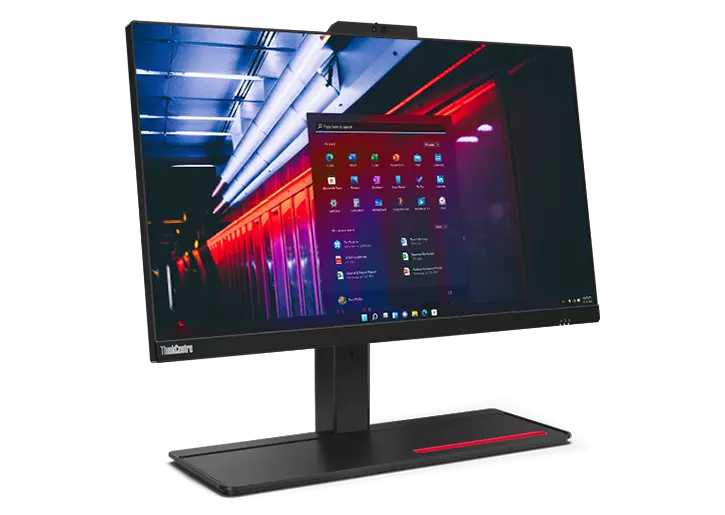
Pros: Clean, clutter-free design; reliable Lenovo durability; good for video conferencing. Cons: Integrated GPU limits heavy graphics work (discrete options available in higher gens). Price: ~$1,000-2,000 configured. Why for business: Reception desks, small teams, or WFH setups appreciate the all-in-one simplicity. Strong security and manageability via Lenovo Vantage.
6. Dell Precision 5860 Tower – Best Workstation for Demanding Professional Tasks. An enterprise workstation with Intel Xeon or high-end Core Ultra, professional NVIDIA RTX GPUs, ECC memory support, and ISV certifications for CAD, engineering, or data science.
Pros: Rock-solid reliability, extensive customization, premier support. Cons: Higher cost and larger size. Price: Starts ~$1,800+. Why for business: Architects, engineers, and data teams get certified stability for AutoCAD, SolidWorks, or analytics software. ISV testing ensures zero crashes under load.
Quick Comparison Table
| Model | Form Factor | Key CPU | RAM/Storage (Base) | Best For | Price Range |
|---|---|---|---|---|---|
| Asus NUC 15 Pro+ | Mini PC | Core Ultra 9 | 16GB/512GB | Compact offices | $600–1,200 |
| Dell Tower Plus | Tower | Core Ultra 7/9 | 16GB/1TB | Versatile productivity | $900–2,400 |
| Apple iMac M4 | AIO | M4 | 16GB/256GB | Creative teams | $1,299+ |
| Apple Mac Mini M4 | Mini | M4/Pro | 16GB/512GB | Space-saving Mac users | $599+ |
| Lenovo ThinkCentre M90a | AIO | Core i7 | 16GB/1TB | Small biz/home office | $1,000–2,000 |
| Dell Precision 5860 | Tower | Xeon/Ultra | 32GB+/1TB+ | Workstations/CAD | $1,800+ |
Final Tips, Maintenance, and Conclusion
Setup and Optimization Tips: Enable Windows Hello/biometrics, use enterprise antivirus (e.g., Microsoft Defender), and configure power settings for performance. For fleets, leverage MDM tools like Intune. Regular driver updates via manufacturer apps prevent issues.
Maintenance for Longevity: Dust internals every 6 months (towers), use surge protectors, and monitor temperatures with free tools. Plan upgrades at 3-4 year marks for RAM/SSD.
Conclusion: In 2026, the best business desktops combine raw power with smart features like AI acceleration and ironclad security. Whether you prioritize compactness (Asus NUC, Mac Mini), all-in-one simplicity (iMac, Lenovo AIO), or expandable muscle (Dell towers), there’s an option tailored to your needs. Evaluate your workflow, budget, and IT requirements—then invest confidently. These machines will drive your business forward for years. Ready to upgrade? Check manufacturer sites or authorized resellers for current configs and promotions.