
How to Get the Best Antenna Signal for Television is not just about plugging in a device and turning on the TV. Many people feel frustrated when they see pixelated images, frozen screens, or the dreaded “No Signal” message. Sometimes you might wonder if it’s your TV, the weather, or something else.
But the truth is, small details make a big difference in antenna performance.
With digital television, getting a strong and stable signal can be challenging, especially if you live far from broadcast towers or in an area with obstacles. The right approach can help you enjoy clear channels, more program options, and even save money by cutting expensive cable.
This guide will show you how to get the best antenna signal for television, step by step. You’ll learn about choosing the right antenna, where to place it, how to set it up, and tips to avoid common mistakes. Let’s make your TV experience smooth and enjoyable.
Understanding TV Antenna Basics
Before you start buying or adjusting an antenna, it’s important to understand how antennas work. A TV antenna receives electromagnetic signals broadcast by local TV stations. Your TV converts these signals into audio and video.
There are two main types of TV signals in most countries today: VHF (Very High Frequency) and UHF (Ultra High Frequency). Different channels use different frequencies. Some antennas are better for one type, while others can handle both. Most modern digital TV broadcasts use UHF, but some channels may still be on VHF. Knowing which frequencies are used in your area can help you choose the right antenna.
Antenna signals are affected by distance from the transmitter, physical obstacles (such as walls, hills, or tall buildings), and even weather conditions. This is why your neighbor might get more channels or better reception than you, even with similar equipment.
Choosing The Right Antenna
The first and most critical step is selecting an antenna that matches your location and needs. Here’s how you can make an informed choice.
1. Indoor Vs. Outdoor Antennas
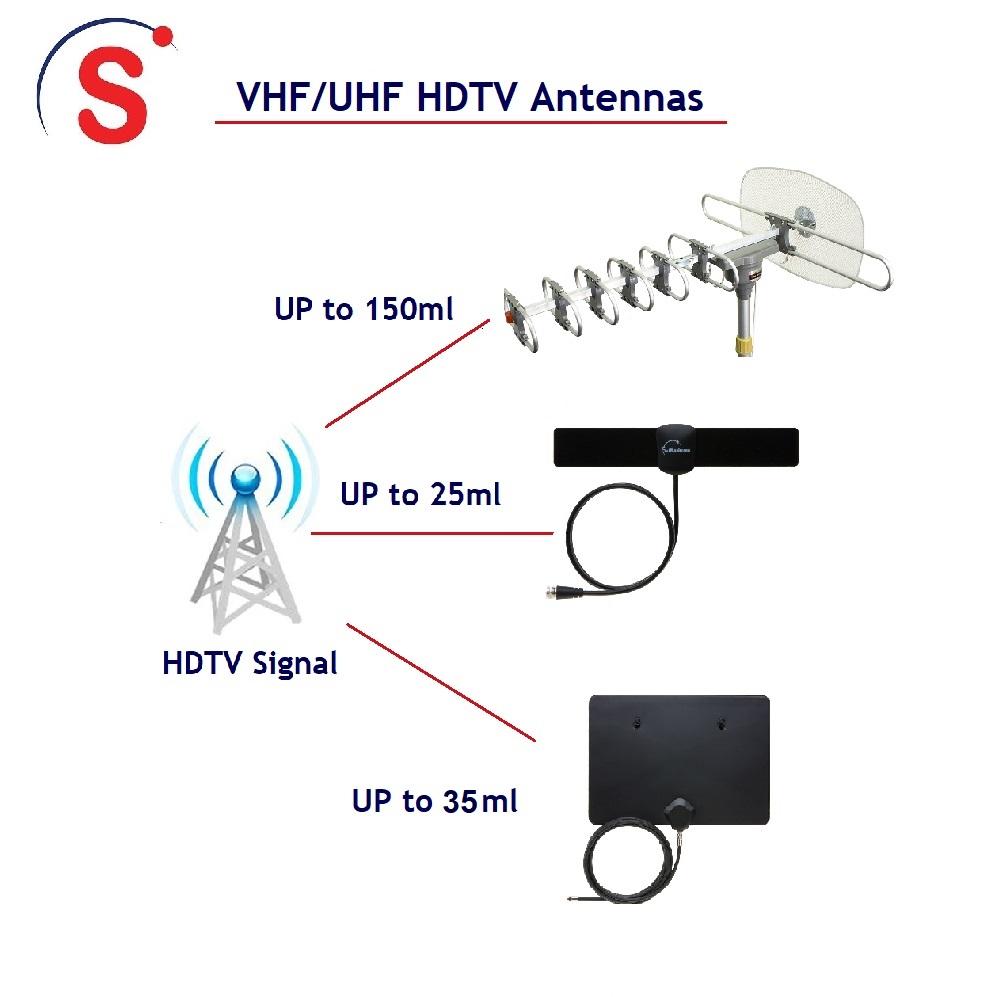
- Indoor antennas are small, easy to install, and good if you live close to broadcast towers (usually within 20 miles).
- Outdoor antennas are larger, more powerful, and work better for people far from towers (20 miles or more), or in areas with many obstacles.
If you’re not sure, start with an indoor antenna. If it doesn’t work well, you can upgrade to an outdoor model.
2. Directional Vs. Omnidirectional Antennas
- Directional antennas focus on signals from one direction. They have a longer range and are best if most TV towers are in the same direction.
- Omnidirectional antennas pick up signals from all directions. They are convenient if towers are scattered around your location.
3. Amplified Vs. Non-amplified Antennas
- Amplified antennas have a built-in signal booster. These are useful if you’re far from towers or have signal interference.
- Non-amplified antennas are simpler and don’t need power. Use them if you’re close to towers and have little interference.
4. Frequency Compatibility
Check if your antenna supports both VHF and UHF frequencies. Most modern digital antennas do, but double-check the packaging or product details.
5. Antenna Range
Manufacturers often list a maximum range (for example, “up to 50 miles”). Be careful: these numbers are usually based on ideal conditions. If you live in a city with many buildings or in a valley, expect the real range to be less.
6. Antenna Size And Design
Larger antennas usually provide better reception. However, some small antennas with good design can work well indoors. Don’t choose the smallest antenna just for looks—performance matters more.
7. Weather Resistance (for Outdoor Antennas)
If you choose an outdoor antenna, make sure it is weatherproof and can withstand wind, rain, and sunlight.
8. Price And Brand
Don’t buy the cheapest option without checking reviews. A reliable brand often means better quality control and support.
Non-obvious tip: Not all “HD” antennas are special. Any antenna can pick up HD channels if your TV supports it. The “HD” label is mostly marketing.
Finding Your Local Tv Towers
Knowing where your local broadcast towers are is essential for antenna placement and selection. Here’s how to do it:
- Go to an online TV station locator like the FCC DTV Reception Maps.
- Enter your address or zip code. The tool will show you a map with the location of towers, channel numbers, and signal strength.
- Note the direction and distance of the towers. This will help you aim your antenna for the best results.
Beginner mistake: Many people install their antenna without checking tower directions, leading to weak or missing channels.
Best Places To Install Your Antenna
Where you place your antenna is just as important as the type you buy. Here’s how to find the sweet spot.
1. Higher Is Better
TV signals travel in straight lines. The higher your antenna, the less likely it will be blocked by walls, furniture, or trees. If possible, place it on the highest floor or mount it near the ceiling.
2. Near A Window
Walls reduce signal strength. Placing your antenna next to a window gives it a clearer view toward broadcast towers.
3. Away From Metal
Metal objects reflect signals and cause interference. Avoid placing the antenna near metal shelves, radiators, or even thick wires.
4. Avoid Electronic Interference
Keep your antenna away from routers, computers, cordless phones, and other electronics that might cause signal noise.
5. Outdoor Mounting Tips
If you use an outdoor antenna:
- Mount it on the roof, attic, or a high pole.
- Make sure it is securely attached to withstand wind.
- Point it directly toward the main TV tower, unless you’re using an omnidirectional model.
6. Test Multiple Locations
Signal strength can change even with small movements. Try different spots and scan for channels each time to find the best position.
Non-obvious tip: In some homes, the attic gives a similar result to roof mounting, but with less weather exposure.
Setting Up And Connecting Your Antenna
Proper setup matters as much as buying the right equipment. Follow these steps for the best results:
- Connect the antenna to your TV using the coaxial cable that comes with it. Make sure it is plugged into the correct port, usually labeled “ANT IN” or “RF IN.”
- If you have an amplified antenna, plug in the power adapter as instructed.
- Go to your TV’s menu and select “Auto Program,” “Channel Scan,” or similar. This lets the TV find all available channels.
- Wait for the scan to finish. Save the channels found.
- Test a few channels for quality. If some are missing or fuzzy, move the antenna and scan again.
Using A Signal Splitter (for Multiple Tvs)
If you want to use one antenna for several TVs, you’ll need a signal splitter. This device divides the signal into two or more outputs.
- Use a high-quality splitter to minimize signal loss.
- For more than two TVs, consider a powered splitter (amplifier).
- Long cable runs also reduce signal strength—try to keep cables as short as possible.
Insight: Each split reduces signal power. If you notice a drop in quality, try a distribution amplifier.
Improving Signal Strength: Advanced Techniques
Sometimes, even after following all the basic steps, you may not get the signal quality you want. Here are advanced tips to boost your results.
1. Use A Pre-amplifier
A pre-amplifier boosts the signal right at the antenna before it travels down the cable. This is especially useful for long cable runs or weak signals.
2. Add A Signal Booster (distribution Amplifier)
A distribution amplifier strengthens the signal for multiple TVs. It’s installed near your splitter.
3. Upgrade Your Coaxial Cable
Old or low-quality cables can cause signal loss. Use RG6 coaxial cable for best results. Avoid thin or damaged cables.
4. Reduce Splitters
Each splitter reduces the signal. Remove any unused splitters or connections.
5. Try A Different Antenna Type
If you started with an indoor antenna and still have problems, consider upgrading to a larger outdoor or attic antenna.
6. Check For Interference
Household electronics, LED lights, or even microwave ovens can cause interference. Turn off nearby devices and see if signal quality improves.
7. Rotate Your Antenna
If towers are in different directions, try slowly rotating the antenna while rescanning channels. Some antennas allow for remote rotation.
8. Ground Your Outdoor Antenna
For safety and better performance, ground your outdoor antenna properly. This protects against lightning and static buildup.
Digital Vs. Analog: Understanding The Differences
Most TV broadcasts are now digital. This matters because:
- Digital signals are “all or nothing”—you either get a clear picture or nothing at all. Unlike analog, there’s no “snowy” or “fuzzy” picture.
- A weak digital signal can cause pixelation, freezing, or complete loss of the channel.
Practical example: If you move your antenna and suddenly lose a channel, it’s likely because the new spot dropped the signal just below the digital threshold.
Weather And Environmental Impact
Weather can affect TV signals, especially if you use an outdoor antenna.
- Rain and snow can reduce signal strength, but usually only during heavy storms.
- Wind can physically move your antenna, changing its direction and reducing signal quality.
- Leaves and branches can block signals, especially when wet.
Tip: If you notice problems only during storms, try securing your antenna better or trimming nearby trees.
Antenna Maintenance And Troubleshooting
Even the best antenna setup can have issues over time. Regular checks can help you avoid signal loss.
Regular Maintenance Tasks
- Inspect cables for cracks or wear.
- Check connectors for rust or looseness.
- Clean the antenna (for outdoor models) to remove dust or bird droppings.
- Tighten mounts to ensure the antenna is still aimed correctly.
Common Problems And Fixes
- Sudden signal loss: Check all connections and cables. Scan for channels again.
- Fewer channels than before: Towers may have changed frequency. Rescan your TV and check online for updates.
- Intermittent signal: Look for loose cables, interference, or physical obstructions.
Non-obvious tip: Sometimes, new construction near your home (such as a new building) can block signals you used to get. Try moving the antenna higher or to a different side of your house.
Comparing Popular Antenna Types
Below is a comparison of indoor, attic, and outdoor antennas to help you decide which suits your needs best.
| Type | Range | Installation | Best For | Downsides |
|---|---|---|---|---|
| Indoor | Up to 20 miles | Very easy | Urban, apartments | Weak in remote areas |
| Attic | 20-60 miles | Moderate | Suburbs, some obstacles | May need power tools |
| Outdoor | Up to 100 miles | Complex | Rural, long distances | Weather exposure |
Insight: Attic antennas are a good compromise if you can’t put one outside but need more range than an indoor model.
Cable Length And Signal Loss: What You Need To Know
The length and quality of the coaxial cable between your antenna and TV can seriously affect your signal. Here’s a simple comparison.
| Cable Length | Signal Loss (Approx) | Recommendation |
|---|---|---|
| Under 25 ft (8 m) | Low | Best for indoor/attic |
| 25-50 ft (8-15 m) | Medium | Use RG6, consider amplifier |
| Over 50 ft (15 m) | High | Amplifier needed |
Tip: Avoid using long or multiple cables if you don’t need them.
Scanning For Channels: Maximizing What You Receive
After setting up your antenna, you must scan for channels. Here’s how to do it right:
- Use your TV remote to access the menu.
- Find the “Auto Program,” “Auto Scan,” or “Channel Search” option.
- Select “Antenna” or “Air” mode.
- Start the scan and wait until it finishes.
Pro tip: Rescan every few months. Broadcasters sometimes change frequencies, and you might pick up new channels.
When To Upgrade Your Antenna
Sometimes, no amount of adjustment will help. Here are signs you need a new antenna:
- You are missing local channels that neighbors receive.
- Your current antenna is damaged, rusty, or very old.
- You want more range or better signal quality.
- Your location has changed (moved to a new house).
Practical example: If you moved from the city to the countryside, an indoor antenna probably won’t work well anymore.

Using Online Tools And Apps
Technology can help you get the best results:
- AntennaWeb.org: Shows nearby towers, distance, and direction.
- TVFool.com: Gives detailed signal reports and antenna recommendations.
- Smartphone compass apps: Help you aim directional antennas accurately.
Non-obvious tip: Some new smart TVs have built-in apps that help with antenna alignment.
Common Mistakes To Avoid
Many people struggle with TV antennas due to common errors:
- Ignoring tower direction: Always check where your local towers are.
- Choosing the wrong antenna type: Match antenna type to your distance and environment.
- Placing the antenna low or behind walls: Elevate for a clear line of sight.
- Using cheap cables or splitters: They can ruin signal quality.
- Not rescanning channels: Do this regularly for best results.
- Not grounding outdoor antennas: This is a safety risk.
The Role Of Antenna Height And Direction
How high and where you aim your antenna can change everything. Studies show that raising an antenna by just 10 feet can improve signal strength by up to 30% in some cases. Always try to point the antenna toward the main cluster of towers in your area.
Example: If your main towers are northeast, point your directional antenna that way. Use a compass or your smartphone to help.
Weatherproofing And Safety Tips For Outdoor Antennas
When installing an outdoor antenna, safety matters:
- Wear gloves and non-slip shoes.
- Avoid installation during wet or windy weather.
- Use proper grounding to prevent damage from lightning.
- Seal all outdoor cable connections with weatherproof tape.
The Truth About “hd Antennas”
Many antennas are marketed as “HD” or “4K ready. ” In reality, all digital antennas can receive HD channels, as long as your TV supports them. The antenna just collects the signal; the TV decodes it. Don’t pay extra for “HD” labels alone—focus on range and build quality.
Indoor Antenna Placement: Hidden Tricks
If you must use an indoor antenna, here are less-known tricks:
- Try placing the antenna flat against an outside-facing wall.
- Attach it high on the wall using removable adhesive.
- Move it away from thick curtains or blinds.
- In multi-story homes, higher floors often give better results.
Insight: Some people get better signals by moving the antenna just a few feet, so small changes can matter.
Antenna Rotators And Multi-directional Solutions
If you live between two cities with different broadcast towers, an antenna rotator can help. This motorized device allows you to change your antenna’s direction from inside your home, using a remote. It’s especially useful if your favorite channels come from different directions.
Some advanced antennas are multi-directional, combining the benefits of both types. These may cost more but save time and effort in the long run.
Real-world Example: Improving Reception In A Challenging Area
Let’s say you live in a rural area, 40 miles from the nearest broadcast tower, with lots of trees and hills. An indoor antenna won’t work well here.
Steps to improve your signal:
- Choose a large outdoor, amplified antenna with a range over 60 miles.
- Mount it on the roof or a tall pole, aiming toward the main tower.
- Use high-quality RG6 cable and as few splitters as possible.
- Install a pre-amplifier near the antenna.
- Ground the setup for safety.
- Scan for channels and adjust aim as needed.
By following these steps, you can receive clear signals even in difficult locations.
Antenna Performance Comparison: Amplified Vs. Non-amplified
Here’s a simple side-by-side look at how amplified and non-amplified antennas compare.
| Feature | Amplified | Non-Amplified |
|---|---|---|
| Range | Longer | Shorter |
| Setup | Needs power | Plug and play |
| Best Use | Far from towers | Close to towers |
| Cost | Usually higher | Usually lower |
Tip: Don’t use an amplifier if you live very close to towers, as it can overload your TV’s tuner.
Final Tips For The Best Tv Antenna Signal
- Always research before buying. Use online tools to check tower locations.
- Test different antenna positions and heights.
- Upgrade cables and splitters if needed.
- Regularly rescan for channels to catch new broadcasts.
- Invest in quality equipment for long-term results.
With the right setup and a little patience, you can enjoy free, high-quality TV without monthly bills. Remember, every home is different—experiment to find what works best for you.

Frequently Asked Questions
Why Can’t I Get All Local Channels With My Antenna?
Some local channels may broadcast from a different direction, use a frequency your antenna doesn’t support, or have a weaker signal. Check tower locations, upgrade your antenna, or try moving it to a higher spot.
How Often Should I Rescan For Tv Channels?
Rescan every 2-3 months, or whenever you adjust your antenna. Broadcasters sometimes change frequencies, and new channels may become available.
Does Weather Really Affect Antenna Tv Signal?
Yes, heavy rain, snow, or strong winds can temporarily weaken signals, especially with outdoor antennas. Secure your setup and try scanning again after storms.
Is A Bigger Antenna Always Better?
Not always. Bigger antennas have more range but may be unnecessary if you live close to towers. Choose size based on your distance and obstacles.
Can I Use One Antenna For Multiple Tvs?
Yes, but you’ll need a splitter or a distribution amplifier. Each split reduces signal strength, so use high-quality equipment and keep cables short.
Getting the best antenna signal for television is a mix of science, patience, and small adjustments. With these strategies and a little trial and error, you’ll unlock the full potential of free TV in your home.
One Response